 Code Inspector
AI Assistant 2.0.0+
The AI Assistant lets you chat with AI directly in the browser and modify code with DOM-related source context.

Quick Start
Enable AI via behavior.ai. Supported providers: claudeCode, codex, and opencode.
codeInspectorPlugin({
  behavior: {
    ai: {
      codex: true,
    },
  },
}),
You can configure multiple providers at the same time. The AI panel shows available providers and selectable models. When no provider is specified, the first available provider is selected by this priority: codex > opencode > claudeCode.
options.model is the default model, and options.models is the selectable model list in the frontend model dropdown. When a user switches models in the panel, that request overrides the provider's options.model.
Usage
Note
Methods 1 and 2 require AI Assistant to be enabled first. Press hotKeys + Z to check the current state. 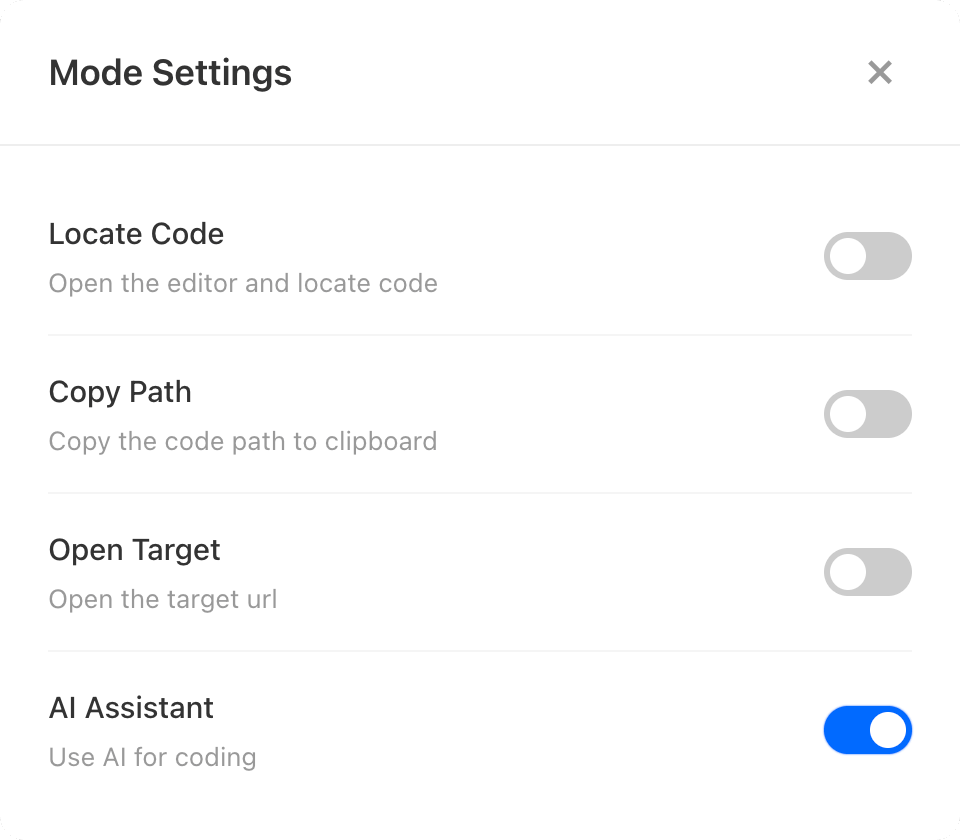
Method 1: HotKeys + Left Click
Hold the combination key (Option + Shift on Mac, Alt + Shift on Windows). Move over a DOM node, then left-click to open AI Assistant with that DOM node's source context.
Method 2: Switch + Left Click
When showSwitch: true and the switch is on, move over a DOM node and left-click to open AI Assistant with the node's source context.
Method 3: HotKeys + Key 4
While holding the combination key:
- If a DOM mask is active, pressing
4opens AI Assistant with that DOM context. - If no DOM mask is active, pressing
4opens project-level AI Assistant.
This method works even when the AI switch is off.
Codex Configuration
type: 'cli': use local Codex CLI (default), best when your local Codex setup is ready.type: 'sdk': use Codex SDK, best when you need explicitapiKey/baseUrlcontrol.type: 'terminal': use the native CLI terminal inside the browser (based onxterm.js+node-pty), with the same options as CLI mode.
Use Codex CLI
Minimal setup:
codeInspectorPlugin({
  behavior: {
    ai: {
      codex: true,
    },
  },
}),
Custom CLI options:
codeInspectorPlugin({
  behavior: {
    ai: {
      codex: {
        type: 'cli',
        options: {
          model: 'gpt-5-codex',
          models: ['gpt-5-codex', 'gpt-5.1-codex'],
          profile: 'default',
          sandbox: 'workspace-write',
          fullAuto: true,
          config: {
            'reasoning.effort': 'high',
          },
        },
      },
    },
  },
}),
Use Codex SDK
Install:
npm i @openai/codex-sdkConfigure:
codeInspectorPlugin({
  behavior: {
    ai: {
      codex: {
        type: 'sdk',
        options: {
          model: 'gpt-5-codex',
          models: ['gpt-5-codex', 'gpt-5.1-codex'],
          approvalPolicy: 'on-request',
          sandboxMode: 'workspace-write',
          cwd: process.cwd(),
        },
      },
    },
  },
}),
Codex SDK .env Setup (API Key / Base URL)
Recommended .env.local values:
# .env.local
OPENAI_API_KEY=sk-xxxxx
OPENAI_BASE_URL=https://your-openai-gateway.example.com/v1
Then pass them explicitly in options:
codeInspectorPlugin({
  behavior: {
    ai: {
      codex: {
        type: 'sdk',
        options: {
          apiKey: process.env.OPENAI_API_KEY,
          baseUrl: process.env.OPENAI_BASE_URL,
          model: 'gpt-5-codex',
          models: ['gpt-5-codex', 'gpt-5.1-codex'],
        },
      },
    },
  },
}),
Use Codex Terminal
Terminal mode opens a native Codex CLI terminal in the AI panel. It requires the current runtime to load node-pty and ws; if terminal support is unavailable, model info is downgraded and displayed as CLI mode.
node-pty is optional
node-pty is an optional dependency (native addon). Package managers skip it when prebuilds/build tools are missing (node-gyp, python, make, g++), so installing code-inspector-plugin still succeeds. Locate and AI CLI/SDK modes keep working; only terminal mode is disabled until node-pty installs successfully.
codeInspectorPlugin({
  behavior: {
    ai: {
      codex: {
        type: 'terminal',
      },
    },
  },
}),
Full Codex Type Definitions
type CodexOptions =
  | {
      type?: 'cli';
      options?: CodexCliOptions;
    }
  | {
      type: 'sdk';
      options?: CodexSdkOptions;
    }
  | {
      type: 'terminal';
      options?: CodexCliOptions;
    };

type CodexCliOptions = {
  model?: string;
  models?: string[];
  profile?: string;
  sandbox?: 'read-only' | 'workspace-write' | 'danger-full-access';
  fullAuto?: boolean;
  skipGitRepoCheck?: boolean;
  ephemeral?: boolean;
  config?: Record<string, string | number | boolean>;
  env?: Record<string, string | undefined>;
};

type CodexSdkOptions = {
  model?: string;
  models?: string[];
  profile?: string;
  config?: Record<string, string | number | boolean>;
  env?: Record<string, string | undefined>;
  skipGitRepoCheck?: boolean;
  codexPathOverride?: string;
  baseUrl?: string;
  apiKey?: string;
  sandboxMode?:
    | 'read-only'
    | 'workspace-write'
    | 'danger-full-access'
    | {
        type: 'workspace-write';
        writableRoots: string[];
        networkAccess?: boolean;
        excludeTmpdirEnvVar?: boolean;
      }
    | {
        type: 'danger-full-access';
        networkAccess?: boolean;
        excludeTmpdirEnvVar?: boolean;
      };
  cwd?: string;
  modelReasoningEffort?: 'minimal' | 'low' | 'medium' | 'high' | 'xhigh';
  webSearchRequest?: {
    searchContextSize?: 'low' | 'medium' | 'high';
    userLocation?: {
      country?: string;
      region?: string;
      city?: string;
      timezone?: string;
    };
  };
  enableWebSearch?: boolean;
  approvalPolicy?: 'on-request' | 'on-failure' | 'never' | 'untrusted';
  additionalWritableRoots?: string[];
};
OpenCode Configuration
type: 'cli': use local OpenCode CLI (default).type: 'sdk': use OpenCode SDK.type: 'terminal': use the native OpenCode CLI terminal inside the browser (based onxterm.js+node-pty), with the same options as CLI mode.
Use OpenCode CLI
Minimal setup:
codeInspectorPlugin({
  behavior: {
    ai: {
      opencode: true,
    },
  },
}),
Custom CLI options:
codeInspectorPlugin({
  behavior: {
    ai: {
      opencode: {
        type: 'cli',
        options: {
          model: 'open-code-model',
          models: ['open-code-model', 'open-code-model-next'],
          profile: 'build',
          env: {
            OPENCODE_CONFIG_DIR: process.env.OPENCODE_CONFIG_DIR,
          },
        },
      },
    },
  },
}),
For OpenCode CLI, profile maps to OpenCode's --agent argument.
Use OpenCode SDK
Install:
npm i @opencode-ai/sdkConfigure:
codeInspectorPlugin({
  behavior: {
    ai: {
      opencode: {
        type: 'sdk',
        options: {
          model: 'open-code-model',
          models: ['open-code-model', 'open-code-model-next'],
          approvalPolicy: 'on-request',
          sandboxMode: 'workspace-write',
          cwd: process.cwd(),
        },
      },
    },
  },
}),
Use OpenCode Terminal
codeInspectorPlugin({
  behavior: {
    ai: {
      opencode: {
        type: 'terminal',
      },
    },
  },
}),
Full OpenCode Type Definitions
type OpenCodeOptions =
  | {
      type?: 'cli';
      options?: OpenCodeCliOptions;
    }
  | {
      type: 'sdk';
      options?: OpenCodeSdkOptions;
    }
  | {
      type: 'terminal';
      options?: OpenCodeCliOptions;
    };

type OpenCodeCliOptions = CodexCliOptions;

type OpenCodeSdkOptions = Omit<CodexSdkOptions, 'config'> & {
  config?: Record<string, any>;
  opencodePathOverride?: string;
};
Claude Code Configuration
Choose A Mode First
type: 'cli': use local Claude Code CLI (default), best when your local Claude Code setup is ready.type: 'sdk': use Claude Agent SDK, best when you need explicitapiKey/baseUrlcontrol.type: 'terminal': use the native Claude Code CLI terminal inside the browser (based onxterm.js+node-pty), with the same options as CLI mode.
Use Claude Code CLI
If Claude Code is installed locally, the plugin will call local CLI via a Node subprocess.
Minimal setup:
codeInspectorPlugin({
  behavior: {
    ai: {
      claudeCode: true,
    },
  },
}),
Custom CLI options:
codeInspectorPlugin({
  behavior: {
    ai: {
      claudeCode: {
        type: 'cli',
        options: {
          model: 'claude-sonnet-4.5',
          models: ['claude-sonnet-4.5', 'claude-opus-4.1'],
          maxTurns: 20,
          permissionMode: 'bypassPermissions',
          allowedTools: ['Read', 'Write', 'Edit', 'Bash'],
          disallowedTools: ['WebSearch'],
          maxCost: 2,
          systemPrompt: 'You are an expert code assistant.',
        },
      },
    },
  },
}),
See Claude Code Overview for installation and setup.
Use Claude Agent SDK
Install:
npm i @anthropic-ai/claude-agent-sdkConfigure:
codeInspectorPlugin({
  behavior: {
    ai: {
      claudeCode: {
        type: 'sdk',
        options: {
          model: 'claude-sonnet-4.5',
          models: ['claude-sonnet-4.5', 'claude-opus-4.1'],
          maxTurns: 20,
          permissionMode: 'bypassPermissions',
        },
      },
    },
  },
}),
Claude SDK mode defaults to maxTurns: 20, permissionMode: 'bypassPermissions', settingSources: ['user', 'project', 'local'], and allows the Read, Write, Edit, Glob, Grep, Bash, WebFetch, and WebSearch tools. If permissionMode is bypassPermissions and allowDangerouslySkipPermissions is not set explicitly, the plugin sets it to true automatically.
Claude SDK .env Setup (API Key / Base URL)
Set .env.local:
# .env.local
ANTHROPIC_API_KEY=sk-xxxxx
ANTHROPIC_BASE_URL=https://your-claude-gateway.example.com
You can also pass them explicitly:
codeInspectorPlugin({
  behavior: {
    ai: {
      claudeCode: {
        type: 'sdk',
        options: {
          env: {
            ANTHROPIC_API_KEY: process.env.ANTHROPIC_API_KEY,
            ANTHROPIC_BASE_URL: process.env.ANTHROPIC_BASE_URL,
          },
        },
      },
    },
  },
}),
Use Claude Code Terminal
codeInspectorPlugin({
  behavior: {
    ai: {
      claudeCode: {
        type: 'terminal',
      },
    },
  },
}),
Full Claude Code Type Definitions
type ClaudeCodeOptions =
  | {
      type?: 'cli';
      options?: ClaudeCliOptions;
    }
  | {
      type: 'sdk';
      options?: ClaudeSdkOptions;
    }
  | {
      type: 'terminal';
      options?: ClaudeCliOptions;
    };

type ClaudeCliOptions = {
  allowedTools?: string[];
  disallowedTools?: string[];
  model?: string;
  models?: string[];
  maxTurns?: number;
  permissionMode?: 'default' | 'acceptEdits' | 'bypassPermissions';
  systemPrompt?: string | { type: 'preset'; preset: 'claude_code'; append?: string };
  env?: Record<string, string | undefined>;
  mcpServers?: Record<string, any>;
  maxCost?: number;
};

type ClaudeSdkOptions = {
  allowedTools?: string[];
  disallowedTools?: string[];
  model?: string;
  models?: string[];
  maxTurns?: number;
  permissionMode?: 'default' | 'acceptEdits' | 'bypassPermissions';
  systemPrompt?: string | { type: 'preset'; preset: 'claude_code'; append?: string };
  env?: Record<string, string | undefined>;
  mcpServers?: Record<string, any>;
  maxThinkingTokens?: number;
  maxBudgetUsd?: number;
  allowDangerouslySkipPermissions?: boolean;
  settingSources?: Array<'user' | 'project' | 'local'>;
  extraArgs?: Record<string, string | null>;
};
For more Claude SDK details, see Claude Code Agent SDK.
Conversation History
The AI Assistant automatically saves each Q&A to the node_modules/.code-inspector/ directory in your project. Click the clock icon in the top-right corner of the chat dialog to browse history. Select an entry to restore its conversation context.
expireDays
- Optional
- Type:
number, default0 - Description: Number of days before conversation history expires. Defaults to
0(no auto-cleanup). When set to a positive integer, opening the history list will automatically clean up records older than the specified number of days.
codeInspectorPlugin({
  behavior: {
    ai: {
      codex: true,
      expireDays: 30, // auto-cleanup history older than 30 days
    },
  },
}),